
TL;DR:
- The Cynthia Gardens property map enables live filtering, virtual tours, and direct application for one-bedroom units. It reduces leasing time by providing real-time availability, precise unit location, and side-by-side comparisons. Users can access the map on mobile, verify unit status, and quickly connect with the leasing team for updates.
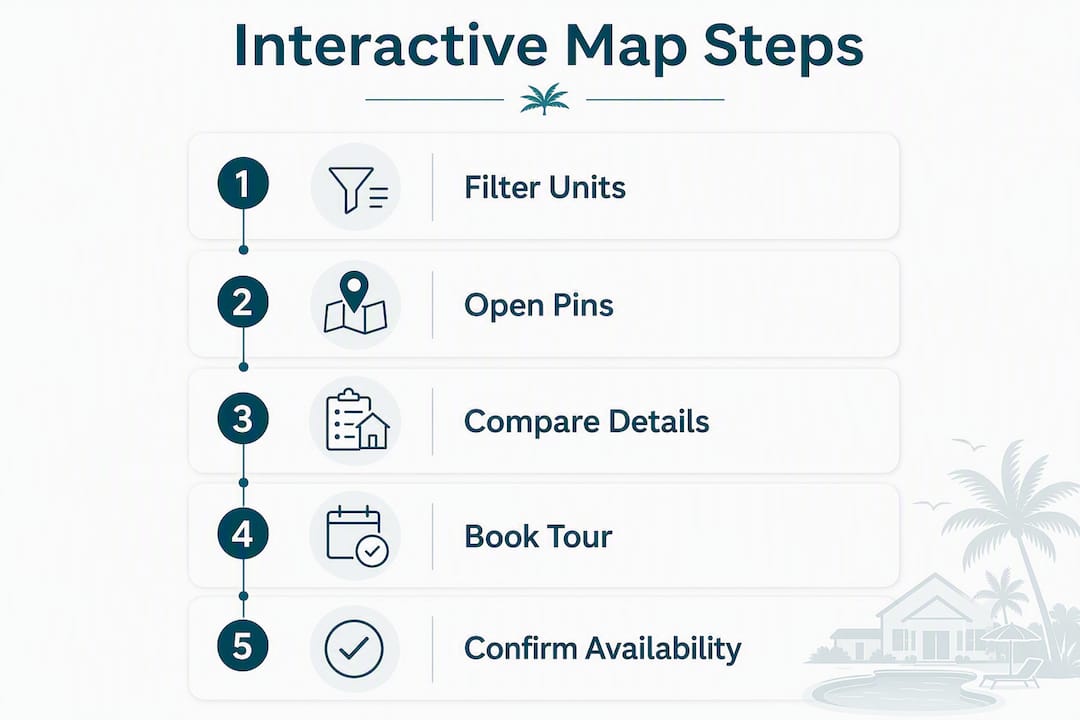
Open the Cynthia Gardens interactive property map, set the filter to one-bedrooms, and you’ll see every available unit as a live pin on the community layout, each showing current price, floor level, proximity to the pool and dog park, and a direct link to a virtual tour. From any unit pin, you have three moves:
- Book an in-person tour directly from the unit page.
- Request a virtual tour to walk the space before you visit.
- Start your application without leaving the page.
That’s the whole flow. Interactive maps give renters real-time availability, exact unit location, and current pricing in a single view, cutting the back-and-forth that traditional listings require. The Cynthia Gardens map has cut leasing time by 40% for the community.
Table of Contents
- How do you compare multiple units side by side on the map?
- Does the map work well on a phone or tablet?
- What if your preferences change after you shortlist a unit?
- Key Takeaways
- The map is the leasing team’s source of truth, too
- Ready to find your one-bedroom at Cynthia Gardens?
- Useful sources and next steps
How do you compare multiple units side by side on the map?
Open two or three unit pins in separate browser tabs, then read them against each other. Each unit page shows the same data set: price, square footage, floor level, and amenity proximity. That parallel structure is what makes the comparison fast.
A few filters do the heavy lifting before you even open a pin. Sort by floor level if you want a quieter top-floor unit away from foot traffic. Filter by proximity to the dog park if you have a pet. Maps let prospects identify units near dog-relief areas or away from busy elevator banks before scheduling a single tour.
Pro Tip: Open the virtual tour link on each shortlisted unit page before committing to an in-person visit. Renters who combine map browsing with virtual tours arrive at decisions faster because they’ve already vetted layout, light, and views online.
Students tend to prioritize units near the entrance for a shorter walk to parking or rideshare pickup. Young professionals often filter for upper floors with less ambient noise. Pet owners zero in on ground-level or first-floor units closest to the dog park and pet-relief areas. The filters surface those differences; a static list never would.
Does the map work well on a phone or tablet?
Yes. The Cynthia Gardens map is built for mobile, so pinch-to-zoom and tap-to-open work the same way they do in any map app. Unit pins are large enough to tap accurately on a 5-inch screen, and the unit detail page loads cleanly without horizontal scrolling.

If you’re touring the property in person, the map doubles as a wayfinding tool that shows you exactly where a unit sits within the community, which building entrance to use, and where parking is relative to your front door. Pull it up on your phone as you walk.
Accessibility features include screen-reader-compatible labels on all unit pins and sufficient color contrast on availability indicators, so the map is usable regardless of device or visual preference.
What if your preferences change after you shortlist a unit?
Check the timestamp on any unit page before you act. Availability updates in real time, so a unit marked available this morning may show “held” by afternoon. If a unit you shortlisted has changed status, go back to the map, reapply your filters, and a fresh set of available pins will populate.
If you’ve already started an application and want to switch units, contact the leasing team directly. The one-bedroom leasing workflow allows unit changes before a lease is countersigned, and the leasing team can confirm whether your preferred unit is still free or flag an equivalent one that just opened.
Key Takeaways
The Cynthia Gardens interactive property map lets you filter one-bedrooms, verify live availability, and book a tour or start an application from a single unit page, cutting leasing time by 40%.
| Point | Details |
|---|---|
| Filter first, then inspect | Set the one-bedroom filter before opening any pins to see only relevant live availability. |
| Verify the timestamp | Check the unit page’s live update timestamp before booking a tour or submitting an application. |
| Audience-specific filters | Students: entrance proximity; young professionals: upper-floor quiet units; pet owners: dog park and ground-floor access. |
| Virtual tour before visiting | Open the virtual tour link on each shortlisted unit to vet layout and light before an in-person trip. |
| Cynthiagardens next step | Use the map at Cynthiagardens.com to shortlist one-bedrooms, then book a tour or apply directly from the unit page. |
The map is the leasing team’s source of truth, too
The availability status you see on each unit pin is the same data the Cynthia Gardens leasing team works from. It updates continuously, not on a nightly batch, so “available” means available right now.
Before you reach out, the leasing team asks prospects to run three quick checks:
- Confirm the live timestamp on the unit page is current.
- Open the virtual tour link and watch it through.
- Screenshot the unit page if you see a status that conflicts with what a team member told you by phone.
The fastest way to hold a unit is to use the AI chat or voice leasing assistant on the site, both available around the clock. For in-person confirmation, call the leasing office during business hours. The team can answer questions about deposits, application timelines, pet policies, and furnished options that the map doesn’t display.
Ready to find your one-bedroom at Cynthia Gardens?
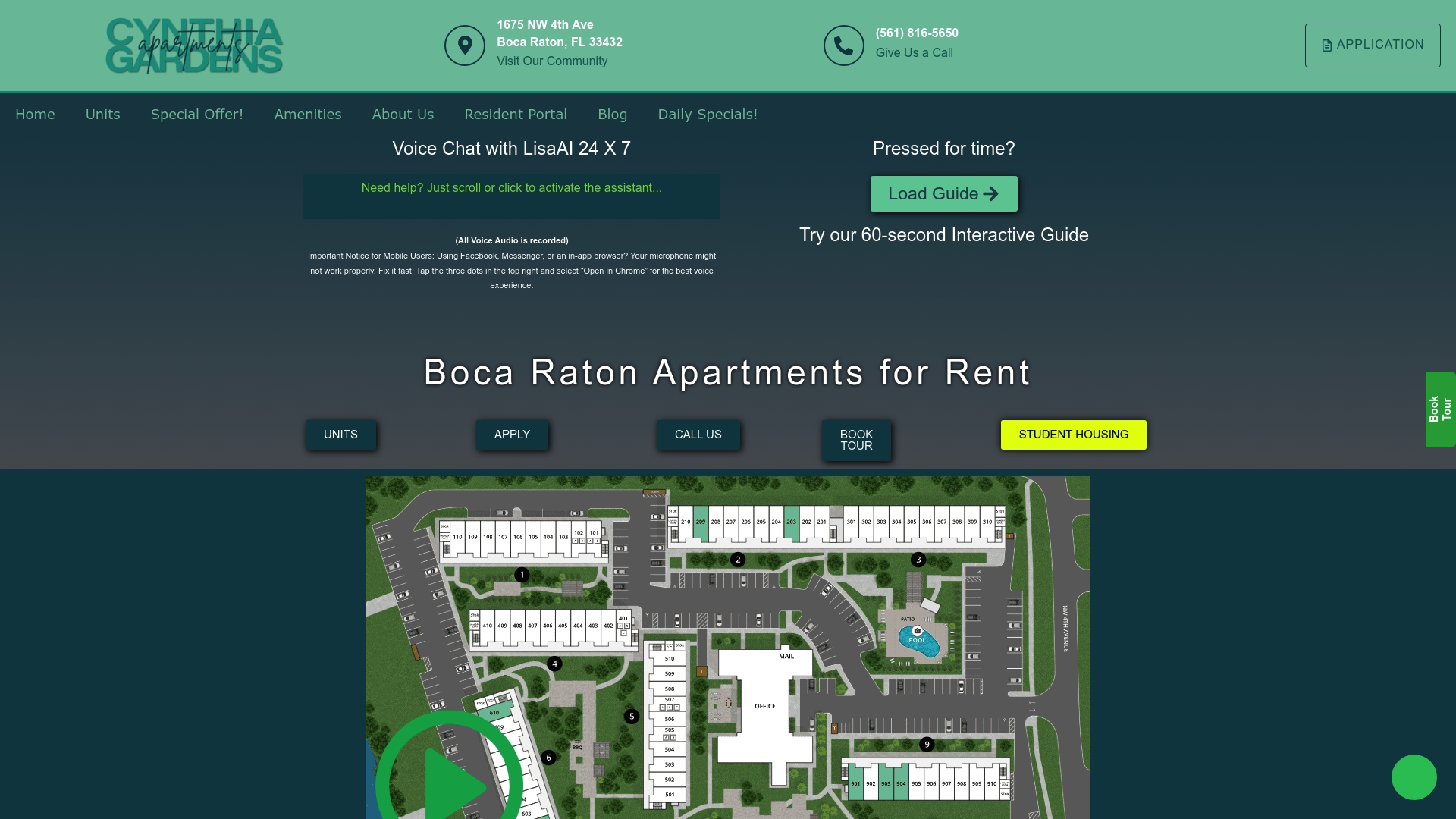
Skip the static listings. The Cynthia Gardens interactive property map shows you every available one-bedroom in real time, with pricing, floor level, and a virtual tour link on each unit page.
Three ways to move forward right now:
- View the map: Browse available one-bedroom apartments and filter by your priorities.
- Book a tour: Schedule in-person or request a virtual tour directly from any unit page.
- Talk to the team: Use the AI chat, voice leasing assistant, or call the leasing office. Pet owners can review the pet-friendly community details before reaching out.
Useful sources and next steps
Cynthia Gardens pages to visit:
- Interactive map and leasing speed case study
- Virtual tour benefits and workflow
- One-bedroom leasing workflow
- Pet-friendly housing at Cynthia Gardens
External sources:
- Multifamily Executive: self-service leasing tools
- Rental Housing Journal: mapping technologies in leasing
- Zillow: interactive property maps and unit-level selection
- National Apartment Association: community map standards
Before you act: Always confirm the live timestamp on any unit page. If the status looks off, screenshot it and send it to the leasing team via AI chat for an instant check.
Recommended
- Interactive apartment map speeds leasing by 40% in 2026
- Cynthia Gardens Featured in Redfin’s Guide to Unique Apartment Amenities – Luxury Apartments for Rent in Boca Raton | Premium Boca Raton Apartments | Aapartments Boca Raton
- News Update: New Garden Style Communities Opening in Boca – Luxury Apartments for Rent in Boca Raton | Premium Boca Raton Apartments | Aapartments Boca Raton
- Living in Paradise: The Gardens Lifestyle in Boca – Luxury Apartments for Rent in Boca Raton | Premium Boca Raton Apartments | Aapartments Boca Raton