
Cable is the better default for most apartment renters: it is faster at the top end, steadier, and lower in latency. Fixed wireless (the 5G home internet plans sold by mobile carriers) wins when cable is poor or unavailable at your address, when you want a plug-in setup with no installer, or when you want a second, independent connection. Below we compare the two on speed, lag, reliability, cost, setup and lease rules, then show how to check what your own building can get.
TL;DR
- Cable typically delivers 300 Mbps to 2 Gbps, while mid-band 5G fixed wireless typically lands at 100 to 400 Mbps, and cable usually has lower latency.
- Fixed wireless performance depends on your distance from the tower and local congestion. Cable is generally more consistent across a neighborhood.
- Fixed wireless is a strong fit for renters who cannot or do not want to drill, wait for a technician or sign a long contract.
- Check your exact address on the FCC National Broadband Map before you sign a lease, and ask the leasing office what is wired into the building.
- For remote work, video calls and gaming, favor cable. For a light household or a backup line, fixed wireless is a sensible choice.
Table of Contents
- What the two technologies actually are
- Speed and latency: where cable pulls ahead
- Reliability: distance, congestion and shared lines
- Cost, contracts and fine print
- Setup and lease rules for renters
- Community Wi-Fi vs a private connection
- Do a speed test before you decide
- How to check what your address can get
- Which one should you choose?
- Our perspective at Cynthia Gardens
- Renting in Boca Raton? Start with a home that is ready for your setup
- FAQ
- Sources
What the two technologies actually are
Cable internet reaches you over coaxial cable that is already in most buildings. A provider’s network carries the signal to your neighborhood, and a cable modem in your unit turns it into internet. The FCC lists cable modem as one of the main broadband platforms, alongside DSL, fiber, wireless and satellite.
Fixed wireless works differently. Radio waves travel from a tower to a fixed receiver at your home. The FCC notes that it is often used where running physical cable is too costly, which is why it began in rural areas. Today’s 5G home internet brings the same idea to cities and suburbs: a gateway the size of a small speaker sits near a window and connects to the carrier’s cell network.
Two terms are worth keeping straight, because shoppers confuse them:
- Wi-Fi is the wireless signal inside your home, from your router to your devices. Both cable and fixed wireless service end in a Wi-Fi router.
- Fixed wireless is how internet reaches your building. It is not the same as Wi-Fi, and it is not the same as tethering your phone.
So “which is faster, cable or wireless?” is really a question about the connection into your home, not the Wi-Fi in it.
Speed and latency: where cable pulls ahead
On raw capacity, cable has the edge. Opensignal’s April 2026 U.S. analysis puts typical cable downlink between 300 Mbps and 2 Gbps, against 100 to 400 Mbps for mid-band 5G fixed wireless. It also reports cable latency often under 60 ms, with 5G fixed wireless often at 80 ms or more. Results vary by provider and by congestion.
What does that mean day to day?
| Activity | Cable | Fixed wireless |
|---|---|---|
| HD and 4K streaming, 2 people | Comfortable | Comfortable on a good signal |
| Video calls for work | Very good | Good, may stutter at busy hours |
| Competitive online gaming | Better, lower lag | Playable, lag spikes more likely |
| Large uploads (video, files) | Varies by plan | Varies by carrier and signal |
| Heavy household, 4+ people | Better headroom | Can feel limited at peak times |
Treat that table as a rule of thumb, not a guarantee. Advertised speed and real speed differ, and Opensignal’s earlier fixed broadband experience report argues that consistent quality matters more for everyday satisfaction than a maximum figure on the box.
If you work from home, upload speed and steadiness matter as much as download speed. Our guide on internet speed for remote work walks through what 25 to 100 Mbps plans can and cannot handle.
Reliability: distance, congestion and shared lines
The two options fail in different ways.
Fixed wireless depends on the tower. According to an industry summary from GSMA, performance hinges on local network conditions and distance from cell towers, while cable performance is generally consistent across a neighborhood. In an apartment, that adds one more variable: where your unit sits in the building. A gateway on a high floor facing the tower can do very well. One in an interior room behind concrete may not.
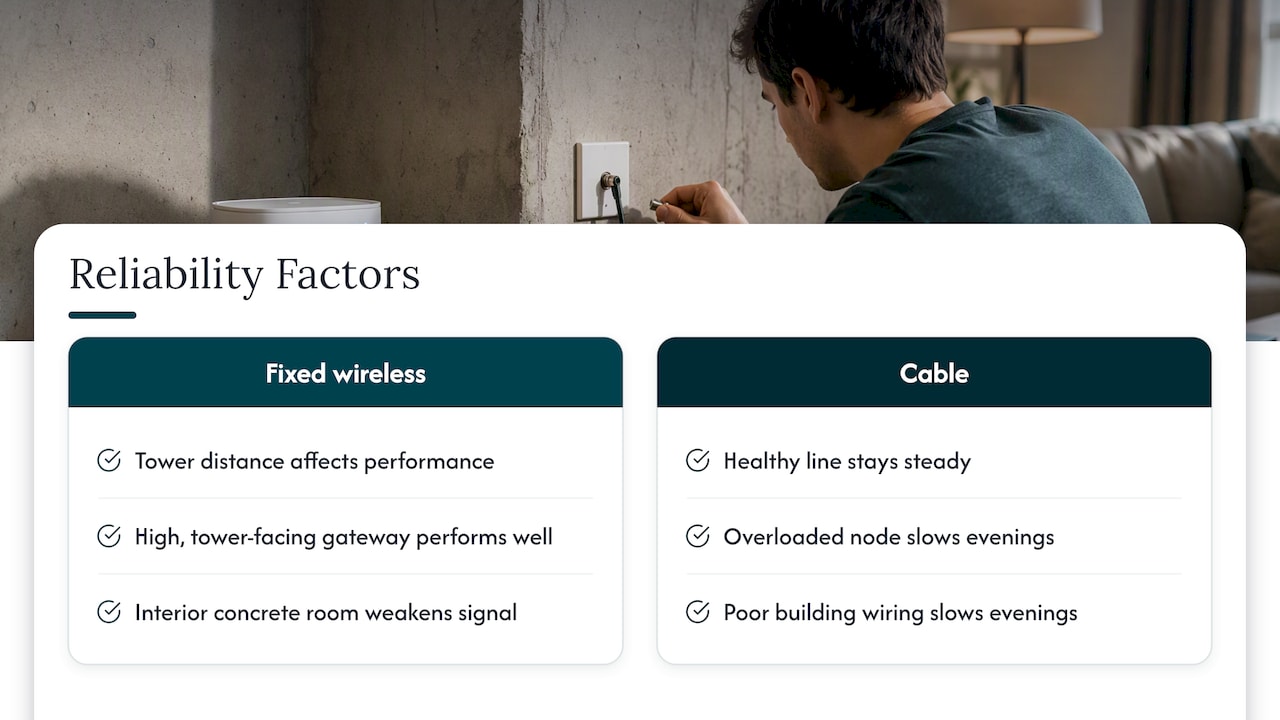
Cable depends on the neighborhood’s shared network and on the wiring in your building. When the line is healthy, it is steady. When a node is overloaded or old building wiring is in poor shape, evenings can slow down.
Buildings in South Florida add a twist. Concrete, stucco and impact glass significantly weaken Wi-Fi signal, and the same materials can weaken a cellular signal reaching a fixed wireless gateway. Many slow-Wi-Fi complaints come from router placement, not the plan. Moving the router to the middle of the unit often helps more than paying for a faster tier.
Cost, contracts and fine print
Fixed wireless plans are usually marketed on simple flat pricing and easy sign-up, and the GSMA summary says competitive pricing and easy deployment are what drew many customers away from cable and DSL. Cable plans often advertise promotional first-year prices that rise later, and may add equipment rental.
Whatever you choose, read the provider’s broadband label. The FCC requires consumer broadband labels meant to show cost and performance in plain terms. Compare these items:
- Monthly price after any promotional period ends
- Equipment rental or purchase cost
- Installation or activation charges
- Data caps or deprioritization during congestion
- Contract length and early termination terms
One equipment note: using the gateway issued by the provider usually works out better than a self-bought router. Opensignal’s analysis of provider-issued gateways finds that remote diagnostics, automatic firmware updates and mesh optimization improve the experience, though buying your own can save rental fees.
Setup and lease rules for renters
This is where fixed wireless earns its place. Market analysts position it for people where wired options are limited, restricted by lease terms, or who want a plug-and-play setup with no drilling or professional installation. For a renter, that means:
- No technician visit, and no waiting for an install window.
- No holes in walls, which most leases forbid.
- Easy to take with you when you move, subject to the carrier’s address rules.
Cable setups vary. In a building already wired for cable, you may only need to activate service and plug in a modem. In others, an installer must run or repair a line, which may need landlord approval.
Other things to confirm before you commit:
- Whether the building has a bulk or community Wi-Fi agreement, and whether it is optional.
- Which jacks in the unit are live.
- Whether the property allows outside equipment (this rarely matters for a window gateway, but matters for anything on a balcony or roof).
For a fuller walk-through, see our apartment internet setup guide and the broader piece on high-speed internet for renters.
Community Wi-Fi vs a private connection
Some apartment communities offer shared or building-wide Wi-Fi. It is convenient, but it is a shared network: you compete with neighbors for capacity, you usually cannot control the router settings, and security is shared too. A private cable or fixed wireless line gives you your own bandwidth and your own network name and password.
A rough rule: shared Wi-Fi suits light use such as email, browsing and a streaming service. A private line is the safer choice if you work remotely, hold video meetings, game, or run smart-home devices. Ask the leasing office what the community network is, and whether you can opt out and bring your own service.
Do a speed test before you decide
An apartment internet speed test is the quickest way to see what you will really get. Do it during a tour or from the neighbor-facing side of your building, and again at a busy hour, since congestion shows up in the evening.
- Test with a laptop on Ethernet if you can, or stand near the router on Wi-Fi.
- Record download, upload and latency (ping).
- Repeat at different times of day.
- Ask current residents what they use and how it behaves at 8 p.m.
Compare results with the plan’s advertised speed on the broadband label. If the real numbers fall well short of the label, ask the provider about it before the lease, not after.
How to check what your address can get
Provider lists by city are a starting point, but availability is address-specific. In Boca Raton, a Boca Raton provider listing shows cable as the most widely available wired option, with the largest cable provider listed at about 87% coverage of the city. Coverage at your own building may differ.
Use the official tool for the real answer. The FCC National Broadband Map shows fixed broadband services, including cable, fiber, fixed wireless and satellite, for a specific address, with advertised speeds. If you want a second look at the method, this resource on checking which providers serve an address covers the same idea of verifying technologies at your door before you commit.
Then do two more things: ask the property which carriers are already wired in, and ask a neighbor which provider they use and how it performs.
Which one should you choose?
Pick by situation rather than by brand:
- Remote worker or grad student on video calls: cable first. Lower latency and steadier performance help. Our note on why renters need internet access explains how much daily life now depends on it.
- Gamer or heavy streamer in a shared unit: cable, for headroom and lower lag.
- Single renter with light use and a short lease: fixed wireless can save time and hassle, especially if the signal at your window is strong.
- Building with poor or no cable service: fixed wireless is the practical option.
- Anyone who cannot afford downtime: use both. A fixed wireless line as a secondary path gives true redundancy because it avoids shared physical infrastructure such as conduits and poles, and a dual-WAN router can switch over automatically. That source is written for businesses, but the logic applies to a work-from-home setup.
Our perspective at Cynthia Gardens
We lease one-bedroom apartments in Boca Raton to young professionals, students and pet owners, and internet is one of the first practical questions new residents ask. Our view is simple: do not choose a connection from a banner ad. Check the address, test the signal, read the label, and choose the connection that matches how you live.
For most of our residents, who work or study from home, we would start with a wired connection and keep a fixed wireless plan in mind as a backup or as an alternative if the wired option disappoints. We would also rather you ask us hard questions during a tour than discover a problem after move-in. That is the same reasoning behind our no-hidden-fees approach to leasing: you should know the full picture before you sign.
— Ayman
Renting in Boca Raton? Start with a home that is ready for your setup
If you are comparing apartments and connections at the same time, our one-bedroom apartments run from $1,990 to $2,220 per month, with online leasing, virtual tours and an interactive property map so you can plan before you visit. Fees are listed openly on our fees page. Ask us what is available at the building and which connection suits your work-from-home needs.
FAQ
Is fixed wireless as good as cable?
Not on every measure. Cable usually offers higher top speeds and lower latency, and it tends to be more consistent. Fixed wireless can be a good match for light to moderate use, and it is the better choice when cable is weak or unavailable at your address.
Can I get home internet without cable?
Yes. Fiber, DSL, satellite and fixed wireless are the other main options the FCC lists, and which ones you can get depends on your address. Check the FCC National Broadband Map to see what is offered where you live.
Is 5G home internet good for apartments?
Often, yes, for renters who want no installer and no drilling. Signal strength inside the unit decides the result, so test it at your window and at a busy hour, and keep in mind that thick concrete and impact glass can weaken signal.
What internet options are there for apartments?
Typical choices are cable, fiber where it has been built, fixed wireless, DSL and the building’s own community Wi-Fi. Ask the leasing office which are wired into the property, then confirm with the FCC map.
Do I need my own router?
Not necessarily. A provider-issued gateway usually allows easier remote troubleshooting and updates, while your own router can save rental fees. Choose based on whether you want hands-off support or lower monthly cost.
Sources
- Opensignal, USA Converged Experience, April 2026
- Opensignal, U.S. fixed broadband experience report (2022)
- Opensignal, How ISP-issued gateways drive better home broadband
- Opensignal, Fixed broadband experience report (December 2025)
- GSMA, The rise of 5G FWA
- FCC, Getting Broadband Q&A
- FCC, Consumer Broadband Labels glossary
- FCC, How to use the National Broadband Map
- Florida Broadband, Managed home Wi-Fi
- Florida Broadband, Business redundancy and failover
- BroadbandSearch, Internet providers in Boca Raton